AI Prompts for a WhatsApp Chat: Summary, Timeline, Open Questions, Reply
Copy-ready prompts for working on a WhatsApp conversation with ChatGPT, Claude or Gemini: a summary, a timeline, open questions, a brief for a professional and a reply draft, with rules that keep the AI honest.
Give an AI a WhatsApp chat and a vague question, and you get a confident, vague answer. Give it the whole conversation, one clear task and a few rules, and it becomes useful. These prompts work with ChatGPT, Claude or Gemini.
First, give it the right material #
- The whole conversation, not screenshots. Export the chat (how).
- Voice notes as text. An AI reading the
.txtsees only “audio omitted”. Transcribe them first, or anything said in audio is lost. - Something to cite. Message dates, or page numbers in a PDF of the chat.
The rules (paste them before any prompt) #
Work only from the attached files. Cite the date and time (or page) for every point. Attribute every statement to the person who made it. If the files don’t answer something, say so instead of guessing. Do not judge who is right and do not guess anyone’s feelings or motives.
Prompts #
Summary
Summarize this conversation in 5–8 short points: who is talking, about what, over what period, the turning points, and where things stand at the last message.
Timeline
List the 10–20 most significant events in chronological order, one line each, with the date of the message.
Agreements
List every explicit agreement or promise: who agreed, what, the amount or deadline exactly as written, and whether a later message shows it was done. If none does, mark it unclear.
Open questions
List the questions the files leave unanswered and the information needed to clarify them.
Brief for a professional
Prepare a concise brief for a [lawyer / accountant / manager], separating stated facts from unanswered questions.
Reply draft
Draft my reply based on the files, marking any details that need my confirmation.
The shortcut #
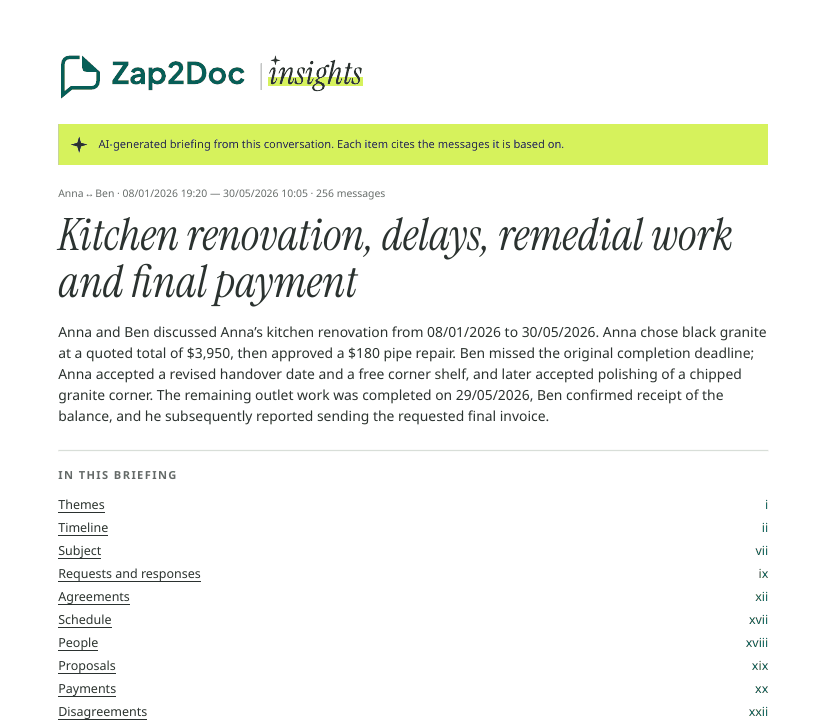
Zap2Doc Insights does the first part for you: voice notes transcribed, a briefing with themes, timeline, agreements and open points, each cited to its page in the conversation PDF. In the Insights tab, Continue with your AI copies a ready prompt (a brief for a professional, open questions, or a reply draft, plus prompts for each theme). Paste it into your AI and attach the Insights PDF. The prompt already tells the AI to work only from the files, cite the page for every point and say when the files don’t answer.
Always check #
Open two or three cited messages at random. If they don’t say what the AI claims, don’t use the answer. More on the basics: summarize a WhatsApp chat.