Client Project Recap from WhatsApp: Status Reports and Wrap-Ups
When a client project runs on WhatsApp, the record of it does too. How to turn the chat into a status report or an end-of-project recap the client can check, line by line.
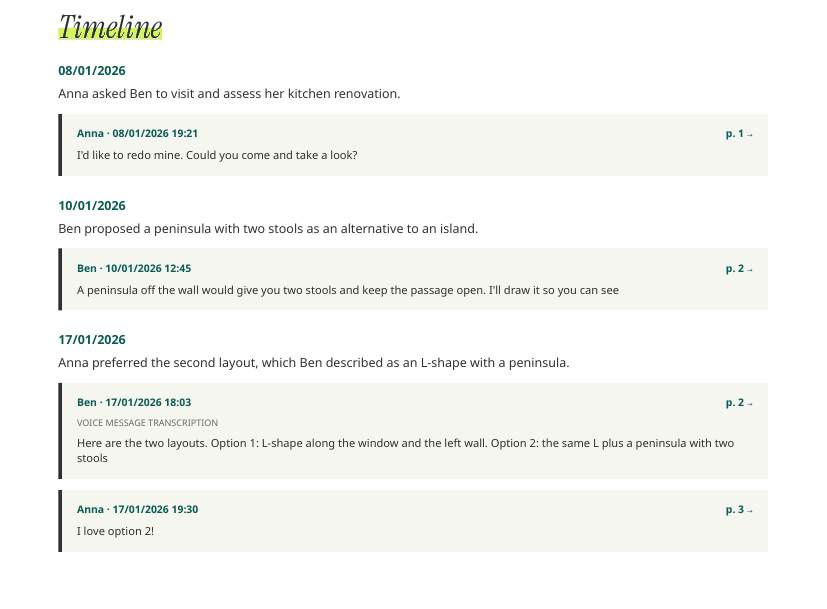
Designers, contractors, consultants, agencies: many client projects live in a WhatsApp thread. Briefs arrive as voice notes, approvals as thumbs-up, changes as “small thing…”. At the end, or halfway through, you need a recap that says what was done, what changed, and what’s left.
Two kinds of recap #
A status report (mid-project) answers:
- what’s done since the last update;
- what was decided or changed;
- what’s waiting on the client;
- what’s next and by when.
An end-of-project recap answers:
- what was delivered against what was asked;
- what changed along the way, and who approved it;
- money: quoted, agreed, invoiced, paid;
- anything left open.
Building one from the chat #
- Export the project chat with media, so briefs and approvals given in voice notes are included.
- Pick the period: since the last report, or the whole project.
- List the changes with the date and who approved each one. This is where most end-of-project friction comes from.
- Separate what’s stated from what’s confirmed. “I sent the payment” is the client’s statement until a later message confirms receipt.
With Insights #
Zap2Doc Insights builds the skeleton:
- a timeline of the project’s key moments, each with its date and message;
- requests from the client and the answer each got;
- proposals and agreements, with amounts and deadlines as written and a fulfilled, pending or unclear status;
- payments, distinguishing a quoted price, an amount requested, a payment reported and a receipt confirmed;
- open points at the last message.
Every item links to its message in the PDF that follows the briefing. When the client says “I never approved the extra room”, you open the citation instead of searching. Brief for a professional gives you a prompt to paste into ChatGPT, Claude or Gemini with the PDF if you want the recap reshaped into your report format.
Tips #
- Send recaps regularly. A short one every two weeks prevents a long argument at the end.
- Keep the tone factual. Dates and messages, not accusations.
- Keep each export. Re-export at milestones; each file covers its own period.
Related: proof of work for freelancers · scope creep change log · unpaid invoice payment trail.