Supplier Dispute? Organise the WhatsApp Orders and Promises
Wrong goods, late delivery, a price that changed: when the orders were placed on WhatsApp, the chat is the order history. How to export it, find the order, the confirmation and the promises, and lay them out.
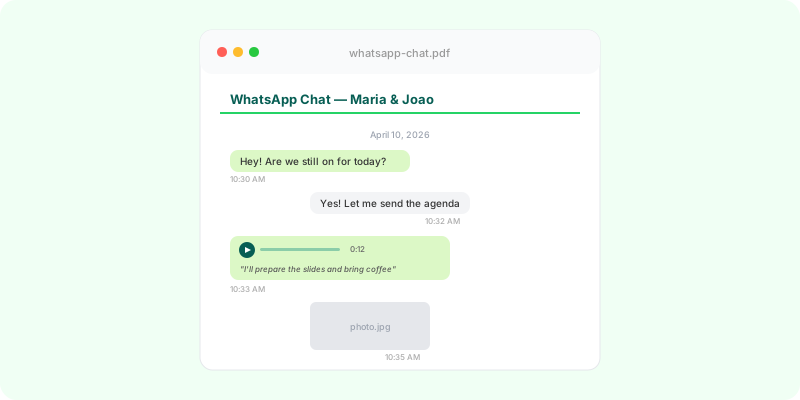
For many small businesses, ordering from a supplier means a WhatsApp message: a photo of the product, a quantity, “can you deliver Thursday?”. When the goods arrive wrong, late or at a different price, that chat is the only order history you have.
What to look for in the chat #
- The order: products, quantities, specifications, photos or references.
- The price: price list, quote, or the message that named it.
- The confirmation: “ok”, “confirmed”, “will deliver Thursday”.
- Payment: transfers, receipts, invoices sent in the chat.
- The problem: photos of what arrived, the dates, your complaint.
- The supplier’s replies: promises to replace, refund, or deliver.
Step 1: export the chat with media #
Photos of the goods, invoices sent as files and voice notes with the order are all part of it (Android, iPhone). If several people in your business dealt with the supplier, export each of their chats.
Step 2: write the summary #
Order by order: what was ordered, when, at what price; what arrived, when; what was promised after. Point each line to its place in the chat.
Step 3: make the chat readable #
Zap2Doc turns the export into a chronological PDF with numbered pages: every message with date and sender, photos and documents in place, voice notes transcribed. Your summary can cite “order confirmed, p. 4” and anyone can check it. You see a free preview before paying.
Step 4: send it #
Send the supplier your summary in writing (in the chat and by email). Keep calm and factual. If that doesn’t settle it, the PDF and summary are what you take to whoever helps you next: a trade association, mediation, a lawyer or a small-claims service, depending on the amount and where you are.
Recurring suppliers? Export the chat at the end of each month or season; it keeps a clean order history and avoids the export limit.