WhatsApp Messages With Your Employer: Organising Them for an Employment Dispute
Overtime asked for on WhatsApp, instructions after hours, being let go by message: the time limits to know, what your chats with the employer hold, and how to organise them into one PDF for a solicitor, your union or ACAS.
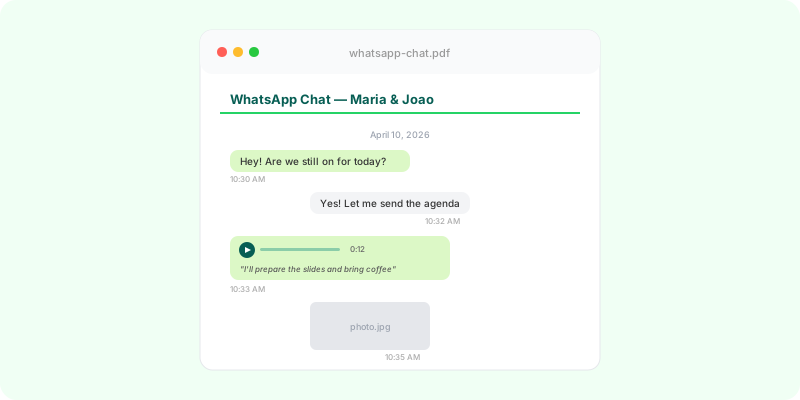
“Can you stay a bit later tonight?” “Send me that report today, even if it’s 11pm.” “We need you in on Saturday.” A lot of working life now runs through WhatsApp: rotas, instructions, chasing — and sometimes the dismissal itself.
When a job ends badly — unpaid overtime, bullying, a dismissal you dispute — those chats are often the most detailed record of what the job was really like. The trouble is that they’re spread across the chat with your manager, the team group and HR, with voice notes nobody will play again.
The time limits are short #
These describe England, Wales and Scotland; Northern Ireland has its own system.
- Early conciliation first: before most employment tribunal claims you must contact ACAS for early conciliation. It’s free, and the clock pauses while it runs.
- Three months less one day: that’s the usual limit for unfair dismissal (from the dismissal) and for unlawful deductions from wages (from the last deduction).
- Two years’ service is generally needed for ordinary unfair dismissal, but some claims — whistleblowing, discrimination — don’t need it.
- Raise a grievance in writing with your employer if you’re still employed; the ACAS Code of Practice sets out how it should be handled.
Two reasons to organise your chats early:
- Access disappears. Many employers remove leavers from groups on their last day, and work phones go back.
- Three months passes quickly.
What work chats hold #
- Hours: clocking-in and clocking-off messages, requests to stay late, tasks sent at night and at weekends.
- Role: what you actually did.
- Pay: agreements about bonuses, commission, payments.
- Treatment: pressure, put-downs, threats — often in voice notes.
- The end: how you were told, when, and what was said about the reasons.
Export each chat with media #
Export the chat with your manager, with HR and each relevant group separately, with media. The guides for Android and iPhone show every screen. Keep the original .zip files yourself.
Team groups contain colleagues’ messages. Share only what’s relevant to your case, and handle it carefully.
Turn the .zip files into readable documents #
Zap2Doc turns each .zip into one PDF:
- Messages in chronological order with the date, time and sender — after-hours messages stand out at a glance.
- Voice notes transcribed in place.
- Images and documents in place, videos as a sheet of 25 frames.
- Numbered pages to refer to.
- On the cover, the SHA-256 of the
.zip, so anyone can check the PDF came from that file.
For a long job, you can limit the document to a date range. The preview is free; you only pay for the full document. Many chats? Zap2Doc Business converts them in batches.
Where the document fits #
- With an employment solicitor, your union or Citizens Advice, alongside your contract, payslips and timesheets.
- In a grievance or during ACAS early conciliation, if your adviser decides to use it.
- On the employer’s side, to respond to a claim with the history of instructions and agreements.
What the PDF is, and what it isn’t #
The PDF is an organised presentation of your WhatsApp export. It doesn’t authenticate the conversation, isn’t a forensic report, doesn’t establish chain of custody and isn’t legal advice. The SHA-256 on the cover identifies the source file; it doesn’t show that the export wasn’t changed before it was uploaded.
In short #
Most claims start with ACAS early conciliation and have a limit of three months less one day. Save your work chats while you still have access, turn each into a chronological PDF with voice notes transcribed, and take them to a solicitor, your union or Citizens Advice.