How to Analyze a WhatsApp Chat: Stats, Patterns and Content
What you can actually learn from a WhatsApp chat export: message counts, who starts conversations, reply times, busiest days, silences, and what was said. How each number is measured and where it misleads.
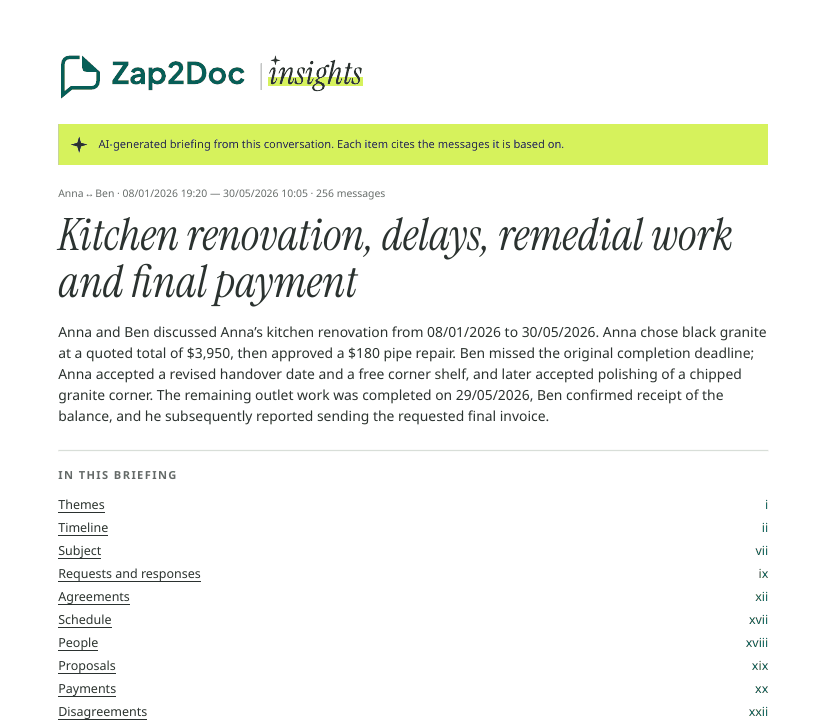
“Analyze a WhatsApp chat” means two different things. One is numbers: who writes more, when, how fast people reply. The other is content: what was discussed, decided and left open. Both start from the same export.
Get the data #
Export the chat from WhatsApp (chat name → Export chat). The .zip contains a .txt with one line per message: date, time, sender, text. That file is everything an analyzer works with. With Include media, the photos and voice notes come along too. More on that choice: with or without media.
The numbers worth looking at #
| Metric | What it shows | How it can mislead |
|---|---|---|
| Messages per person | Who writes more | Some people send one long message, others ten short ones |
| Who starts conversations | Who reaches out | Depends on how a “new conversation” is defined |
| Median reply time | How fast each side answers | Night hours and weekends weigh in |
| Longest silence | When contact stopped | A phone call or a meeting leaves no trace in the chat |
| Busiest day | When something happened | A spike is a clue, not an explanation |
| Time of day, day of week | Routines | Time zones shift everything if you live apart |
| Voice notes | How much was said in audio | Count says nothing about content |
In Zap2Doc Insights, a conversation starts after at least 6 hours of silence, and reply times count answers to the other person within 24 hours. Knowing the definition is what lets you read the number honestly. The free preview already shows part of this for your chat: how many messages, who writes them, at what time of day and on which days.
The content #
Numbers tell you that a conversation got busy in March. Content tells you why. The Insights briefing covers:
- an overview and the main themes;
- a timeline of significant events;
- requests and the answers they got, proposals, agreements with their status, payments as stated;
- disagreements, each side’s position attributed and cited;
- open points at the last message.
Voice notes are transcribed and read with the text. Photos and documents are not opened; what the briefing says about them comes from what people wrote around them.
Read it like an analyst #
- Every claim should cite messages. In Insights each item links to the message in the PDF. If you can’t check a point, don’t rely on it.
- Separate what was said from what happened. “I paid on Monday” is a statement. The briefing reports it as one unless a later message confirms receipt.
- Don’t read minds. The analysis stays neutral and doesn’t guess motives or feelings. That’s deliberate.
Want to see the output first? Here’s a sample Insights PDF. Before uploading, read is it safe to upload a WhatsApp chat?