A WhatsApp Chat PDF, Explained Part by Part
What a Zap2Doc PDF contains, shown on a real sample: the cover and its SHA-256, messages in order, attachments in place, transcribed voice notes, video frames — and what the document can and can't show.
Before you upload a private conversation, it’s fair to want to see what you’ll get back. Here is a real Zap2Doc PDF — a short purchase conversation between a shop and a customer — taken apart piece by piece. You can also download the full sample PDF.
The cover: what the document is, and which file it came from #
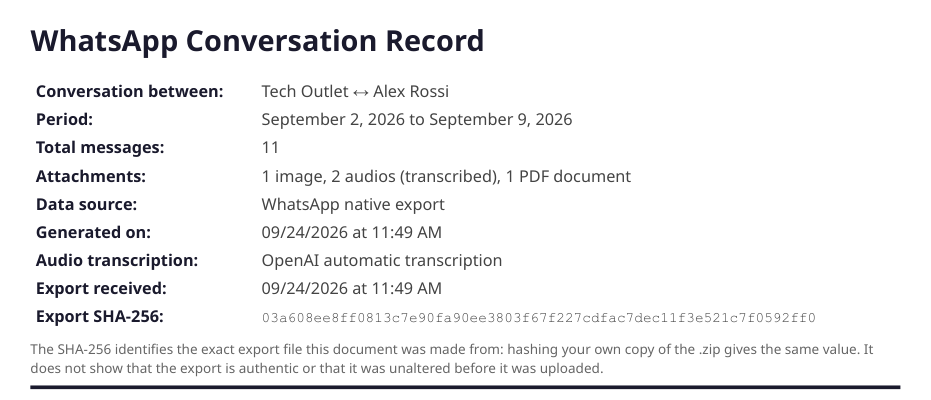
The first page says what’s inside before anyone reads a message:
- Conversation between the participants, and the period it covers.
- Total messages and the attachments, by type — so a reader knows what to expect.
- Data source and generated on, and which service transcribed the audio.
- Export received and Export SHA-256: when the
.zipreached Zap2Doc, and its fingerprint. Anyone can hash their own copy of the.zip(shasum -a 256on a Mac,certutil -hashfile … SHA256on Windows) and check that the 64 characters match. - If you chose a date range or the document was split into parts, a line says how many messages the full export had — so it’s visible that the document covers only part of it.
Messages in order, with the date, time and sender #
Every message appears in the order it was sent, with the sender’s name and the date and time as the phone recorded them. Each person gets their own colour, and each day starts with a divider, so a long conversation is easy to follow and to cite by page number.
Attachments where they were sent #
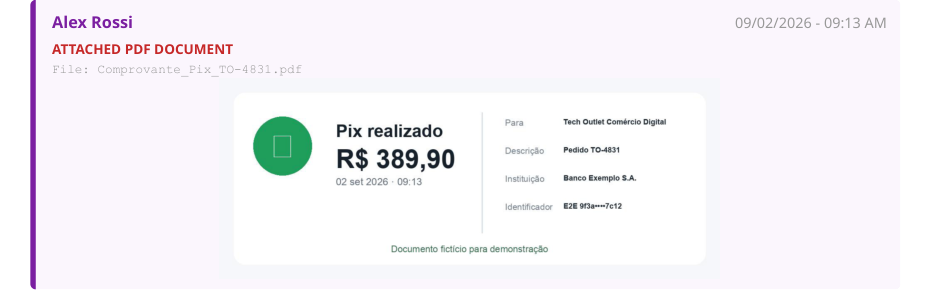
Photos appear at the point in the conversation where they were sent. PDF attachments — here, a payment receipt — are shown as page images in the same place, with the original file name beneath. Files the PDF can’t show (a spreadsheet, a contact card) are listed by name, so nothing disappears silently.
Voice notes, transcribed in place #
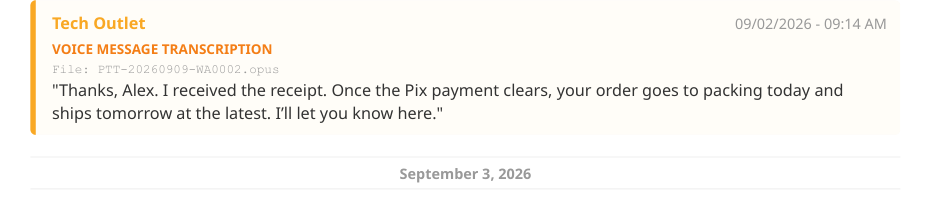
Each voice note appears where it was sent, labelled as a transcription, with its original file name and the text in quotes. The transcription is automatic: it’s accurate on clear recordings and less so with noise or overlapping voices, so check important passages against the original audio, which stays in your .zip.
Videos as frame sheets #
A PDF can’t play video, so each video becomes a sheet of 25 frames taken from start to finish, in the place where it was sent. You can turn this off when you configure the document.
What the document shows, and what it can’t #
It shows:
- the messages exactly as they are in the export, in order;
- who sent each one — using the name saved on the phone that exported the chat;
- the date and time each was sent, as that phone recorded them;
- the photos, documents and voice notes that were included in the export;
- which parts are machine output (transcriptions) and which are the people’s own words;
- which file the document was made from (the SHA-256).
It can’t show:
- that the export wasn’t edited before it was uploaded — the export is a text file and nothing signs it;
- who was actually holding each phone or controlling each account;
- messages that were deleted, disappearing messages that already vanished, or view-once media;
- anything beyond WhatsApp’s own export limits (the most recent 10,000 messages with media);
- that a phone’s clock was set correctly.
The PDF is a presentation of your export. It isn’t authentication, a forensic report, a chain of custody or legal advice.
Try it on your own chat #
Export the chat, upload the .zip to Zap2Doc and look at the free preview before you decide.
Every order also includes the conversation as a Markdown file for ChatGPT, Claude or Gemini, with each day’s PDF page — how to use it.