WhatsApp Chat to PDF for a Complaint or Formal Record
Filing a complaint and the conversation is in WhatsApp? Export the chat, turn it into one chronological PDF with voice notes transcribed, and hand it over.
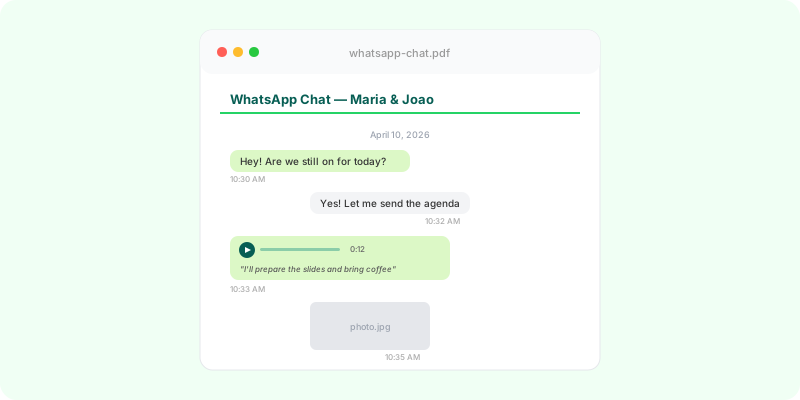
You’re filing a complaint — with the police, a consumer body, an employer, a platform — and the conversation that matters is in WhatsApp. The practical question is what you hand over, and in what form.
The short version: export the whole chat with media included, convert it into one chronological PDF where the voice notes are transcribed in place, keep the original .zip alongside it, note the date you made the export, and ask the office what format they accept before you go. The rest of this page is each of those in detail — including what such a document does not do, which is worth knowing before you rely on it.
WhatsApp Chats as Formal Records #
WhatsApp conversations now contain a substantial portion of everyday business and personal agreements: delivery dates, payment confirmations, contract terms, scope changes, decisions made between partners or with clients. When something goes wrong — a missed payment, a disputed delivery, a broken promise — the conversation history is often the clearest record of what was actually agreed.
Turning that conversation into a clean, organized PDF gives you a document that is easier to review, share with a lawyer, or submit alongside other records.
This guide covers what to include in a PDF intended for serious record-keeping, what limits to be aware of, and how to produce a document that holds up well to scrutiny — without overpromising what such a document can do.
What a Useful Record PDF Contains #
Whether the goal is a lawyer review, an internal audit, or just a clean archive for your own files, a well-built PDF of a WhatsApp conversation should include:
- Every message in chronological order, with sender names and timestamps
- The date range clearly marked at the top of the document
- Voice messages transcribed inline, not skipped or listed as separate files
- Images rendered inline where they appear in the chat, so context is preserved
- Document attachments listed with their original filenames
- A clean, neutral typography — easy to read, not styled like marketing copy
The export should reflect the conversation as it happened: no edits, no inserted commentary, no rearranged messages. A reader unfamiliar with the chat should be able to follow it from start to finish.
What WhatsApp Exports Already Give You #
WhatsApp’s native “Export Chat” function (Contact/Group Info → Export Chat) gives you a .zip containing:
- A plain
.txtfile with every text message, dated and timestamped - Original-quality images (or thumbnails, depending on export size)
- Voice message files in
.opusformat - Document and file attachments in their original formats
This raw export is technically complete, but it’s awkward to read. The .txt file mixes timestamps and content into long unbroken lines. Images are filenames, not pictures. Voice notes are unplayable in most viewers. Anyone reviewing it will spend more time decoding the format than reading the content.
A proper PDF conversion fixes this by laying out the conversation as a normal document and rendering the media inline.
What a PDF Does and Doesn’t Establish #
It’s worth being explicit about this: a PDF generated from a WhatsApp export is a presentation of the export data, not a forensic artifact.
What the PDF does:
- Presents the conversation in a readable, chronological format
- Preserves the message content exactly as it appears in the WhatsApp export
- Includes media (images, voice transcripts) in their original position
What the PDF doesn’t do on its own:
- It does not authenticate that the conversation occurred between specific people
- It does not prove who controlled the WhatsApp accounts at the time
- It does not establish chain of custody from your phone to the document
What any of that is worth in a given process is not something a converter can answer: requirements differ by country, by office, and by the kind of matter. The PDF is a presentation layer, and everything beyond it — how the export is accounted for, whether the device is examined, what else is needed alongside it — sits outside the document. Ask the office you’re filing with what they require, and speak to a lawyer in your own country before relying on a chat export for anything serious.
Practical Tips for a Strong Record #
A few practical points that make a record PDF more useful:
1. Export as soon as possible. WhatsApp’s local storage of older messages can be lost (uninstalls, device changes, storage cleanups). Export while the data is current.
2. Export the full chat, not a selection. Selective exports invite questions about what was left out. Full exports are easier to defend.
3. Include media. WhatsApp gives you the choice “Without Media” or “Include Media” on export — for any serious record, include media. Images and voice notes often contain the most important content.
4. Note the export date. The PDF should show when the export was done, not just the conversation date range. This matters for chain-of-custody discussions later.
5. Keep the original .zip. The PDF is the readable version, but the original .zip from WhatsApp is the source. Keep both — never rely only on a derived document.
6. Don’t edit the PDF. Once generated, treat it as immutable. If you need to add commentary or context, do it in a separate document.
Taking It to a Police Station or Consumer Office #
Filing in person is where the format of the document stops being a detail. A few things worth settling before you go:
Ask what they accept. Practice differs between offices and countries — a PDF by email, a printed copy, a file on a drive, or nothing but the phone in front of an officer. One phone call ahead of time is cheaper than a second trip.
Bring the readable version and the original. The PDF is what a person can sit and read. The .zip is what it was produced from. Take both: the PDF printed or on a drive, the .zip on the drive or in your own email where you can reach it.
Bring the phone. If anyone wants to see a message in the app itself, the device is the only place that can happen.
Say when the export was made. The dates inside the conversation and the date you exported it are two different things, and only one of them is visible in the messages.
Keep your commentary separate. If you need to explain what a message meant or why it matters, put that in a covering note rather than annotating the document, so the record and your account of it stay distinguishable.
None of this makes the document more than it is — a readable presentation of your own export. It does make it easier for someone else to work with, which is usually the difference between a file that gets read and one that gets handed back.
What Voice Transcription Adds #
Many of the most important moments in a WhatsApp conversation happen in voice notes: verbal agreements (“yes, send it”), specific terms (“we agreed on the 28th”), tone (hesitation, acceptance, refusal).
A PDF that includes transcribed voice notes captures these moments in text form, alongside the typed messages. This makes the document searchable, easier to quote, and faster to review. The original audio files are still in the .zip if anyone needs to verify the transcription.
Zap2Doc transcribes voice notes automatically using OpenAI’s transcription models, with the transcript appearing inline below each audio entry. No manual transcription, no separate audio playback required to follow the conversation.
Cross-Border and Multilingual Considerations #
For business or legal contexts that span borders, a few extras matter:
- Language: if the conversation is in Portuguese, Hindi, Arabic, or any non-English language, the PDF interface and structure should be in that language. A reader (or judge, or business partner) shouldn’t have to navigate English headers to read a conversation in their own language.
- Date format: clarity about timezone and date format (DD/MM/YYYY vs MM/DD/YYYY) avoids ambiguity.
- Right-to-left (RTL) text: for Arabic or Hebrew conversations, the PDF needs proper RTL layout — not just translated text dropped into a left-to-right template.
Zap2Doc supports 8 languages, including Hindi and Arabic, with right-to-left layout for Arabic conversations — so the document matches the language of the conversation it captures rather than dropping it into an English template.
How to Generate a Clean Record PDF #
The workflow is straightforward:
- Export the chat from WhatsApp (Contact/Group Info → Export Chat → Include Media)
- Save the
.zipsomewhere stable (cloud storage, encrypted drive) - Upload to Zap2Doc — drag and drop the
.zip - Review the preview to confirm the date range and content
- Download the full PDF — voice notes transcribed, images inline, full chronology
The whole process takes about 2-5 minutes for a typical conversation. The resulting PDF is text-searchable, prints cleanly, and travels well as an email attachment.
FAQ #
How do I convert a WhatsApp chat to PDF for a complaint?
Export the chat with Include Media, which gives you a .zip, then convert that into a single chronological PDF with sender names, timestamps, images in place and voice notes transcribed. Keep the original .zip alongside the PDF, and note the date the export was made.
Should I export the whole conversation or just the relevant part? The whole chat. A conversation that begins mid-thread invites the question of what came before it, and a full export is simpler to explain than a selection.
Should I bring a printed copy or a file? Ask the office first — practice differs. Some accept a PDF by email, some want paper, some take a file on a drive, and some will want to look at the messages on the phone. Bring the phone either way.
Does a PDF of my chat prove what was said? No. It’s a readable presentation of your export. On its own it doesn’t authenticate who was using the accounts, and it doesn’t establish how the file travelled from the phone to the document. What weight it carries depends on the country and the office — ask them, and speak to a lawyer where the matter is serious.
What about the voice messages?
They often hold the part that matters, so a record that skips them is incomplete. Transcribed inline they become part of the searchable document, and the original audio stays in the .zip if anyone wants to hear it.
Bottom Line #
A PDF generated from a WhatsApp export is the most practical way to make a conversation readable, shareable, and reviewable. It’s not a forensic certification, and shouldn’t be marketed as one — but for the vast majority of business and personal record-keeping needs, it’s exactly the right tool.
Pair it with the original .zip (for verification) and clear documentation of when and how the export was done, and you have a solid record. For specific legal questions about admissibility, jurisdiction, or authentication, talk to a lawyer in your region — every legal system handles digital messages a little differently.
Convert your WhatsApp chat to a clean PDF at Zap2Doc. Voice transcription is included.