How to Organize Client WhatsApp Conversations Before They Get Lost
Do you serve clients over WhatsApp? A four-step routine — export, name, convert, file — so the history doesn't die on the phone of whoever handled the account.
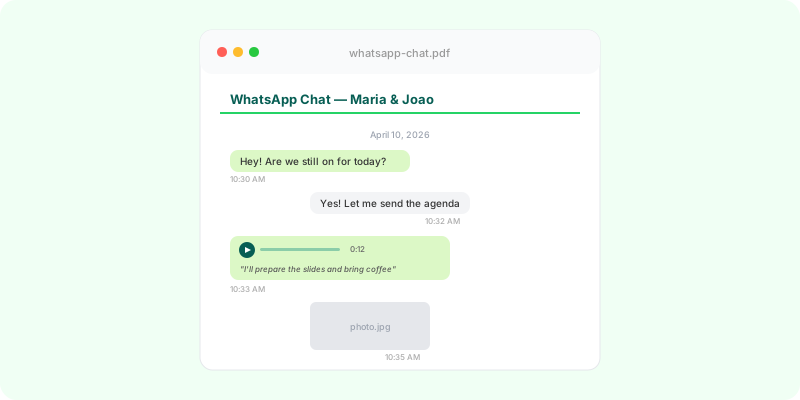
WhatsApp became the system of record for a lot of businesses without anyone deciding it. The client sends the photo of the document there, approves the quote in a voice note, agrees the deadline in a message on Saturday night. It works — until the day you need to find something.
And that day arrives in one of three ways. The person who handled the account left, and the number went with them. The phone broke, and the backup was months old. Or the client says they never approved that, and you are certain they did, in a forty-second voice note, some month last year.
Organizing this is not about adding bureaucracy. It is a four-step routine that fits into closing a case or closing a month.
1. Export at the close, not in the emergency #
Define the trigger: the project was delivered, the contract ended, the case closed. For recurring clients, the end of the month. At that moment, whoever handled it exports the chat from their own phone, with media — it takes a minute (Android, iPhone).
Exporting in the emergency is the opposite: chasing a history that may have been deleted to free up space, on a device that may no longer be with the company.
2. Name it so it outlives whoever named it #
One folder per client. Inside it, the file named with client, subject and export date: acme-contract-2026-09.zip. Whoever opens that folder in two years understands what it is without asking anyone.
If the same chat is exported again later, keep the new one next to the old one, not over it. The new one has more messages; the old one is what existed on that date, and sometimes that is what matters.
A spreadsheet with client, file, date and who exported it closes the step. Five rows a month.
3. Turn it into something readable #
The .zip keeps everything, but nobody reads a .zip: the text is in an unformatted .txt, the photos are loose in a folder and the voice notes are three hundred .opus files nobody will ever listen to again.
Converted to PDF, the chat becomes a document: in order, with the photos where they were sent and the voice notes transcribed where they were spoken. The “approved” you remember hearing becomes a Ctrl+F.
For one conversation, Zap2Doc does it on the spot. For the month’s pile, Zap2Doc Business converts them all in one batch, one PDF per client, with a discount from ten.
One rule about transcription: it is for finding, not for quoting. Before you argue a figure or a date with a client, listen to the original voice note.
4. Keep both files together #
The .zip is the source; the PDF is the reading copy. Both live in the same folder, and the folder lives in the company’s storage — not in Zap2Doc, which deletes the export after generating the PDF and keeps the PDF for 7 days.
This is client data. Anyone who doesn’t work on that account doesn’t need access to the folder.
What the routine gives back #
Whoever replaces an account handler reads the PDF instead of scrolling through two years of chat. A “you told me” argument ends in five minutes, with a search. And the company’s history stops living on somebody’s phone.
If the conversation is heading toward a dispute, the workflow is different and has its own post: WhatsApp conversations for lawyers.