How to Convert a WhatsApp Chat to PDF
How to Convert a WhatsApp Chat to PDF
WhatsApp lets you export conversations, but the raw .txt file it produces is hard to read and nearly impossible to share professionally. Converting your WhatsApp chat to PDF gives you a clean, formatted document that anyone can open on any device.
Why PDF?
PDF is the universal format for documents. Unlike .txt files, a PDF:
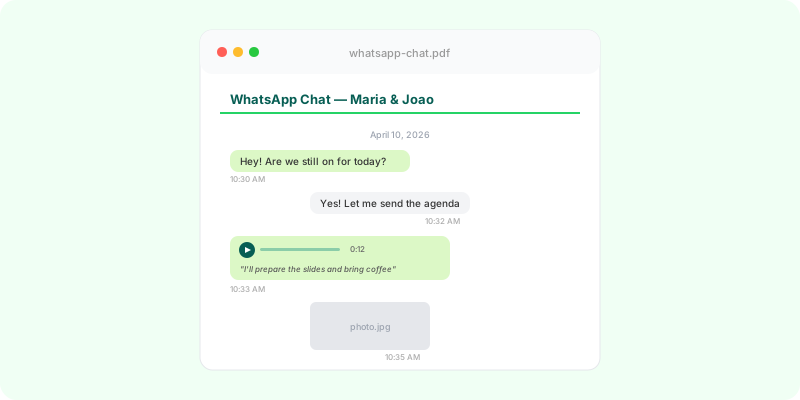
- Preserves formatting — timestamps, sender names, and content are laid out clearly
- Includes images — photos appear inline, not as cryptic filenames
- Is searchable — find any message by keyword
- Is shareable — works on every device without installing anything
- Is archivable — PDFs are stable long-term, unlike proprietary app formats
How Zap2Doc Works
Zap2Doc converts WhatsApp exports to PDF in four steps:
-
Export your chat — On iPhone: go to Contact/Group Info → Export Chat. On Android: tap the three-dot menu → More → Export Chat. Save the
.zipfile. -
Upload the zip — Drag and drop or browse to your
.zipfile on Zap2Doc. The file uploads directly to secure cloud storage — never processed on our servers. -
Preview instantly — You’ll see a one-page preview with your chat stats: total messages, number of images, and audio duration. No payment needed for the preview.
-
Download your PDF — After a quick payment, we generate the full PDF. It includes every message, image thumbnails, and AI-powered transcriptions of voice messages.
What’s Included in the PDF
- All messages with dates and times
- Sender names on each message
- Image thumbnails (inline)
- Voice message transcriptions (powered by Whisper AI)
- Document and file attachments listed
- Clean, readable typography
What About Voice Messages?
This is where Zap2Doc stands out. Voice messages in WhatsApp exports are .opus audio files. Instead of leaving them unreadable, Zap2Doc transcribes each one using OpenAI’s Whisper — automatically, in the original language, with no extra steps from you.
The transcript appears directly below the audio entry in the PDF, so you can read the full conversation without missing anything.
Privacy
Your files are uploaded with a secure, time-limited link and deleted automatically after 7 days. We never read your messages — processing is automated.
Get Started
Export your chat from WhatsApp, then visit Zap2Doc to convert it. Takes about 2 minutes for most conversations.